HR teams were running people on spreadsheets
Growing companies handled hiring, leave, reviews and pay across spreadsheets, email threads and paper forms. HR spent its time chasing information instead of supporting people.
Records everywhere
Personal details, contracts and documents lived in different files, so nobody had one true view of an employee.
Leave by email
Requests and approvals happened in inboxes, and balances were worked out by hand.
Reviews without data
Performance cycles ran on documents, so goals, feedback and ratings were impossible to compare across teams.
Payroll on trust
Salary bands, allowances and deductions were rebuilt every month, with no clear approval trail.
How might we give HR one place to hire, manage, review and pay people, and give every employee the answers they need without asking HR?Design challenge
Four principles behind every screen
WorkScape covers a lot of ground. These rules kept each module simple and the whole product consistent.
One product, two experiences
HR admins get control and oversight. Employees get a self-service view of their own leave, pay and goals.
Surface what needs a decision
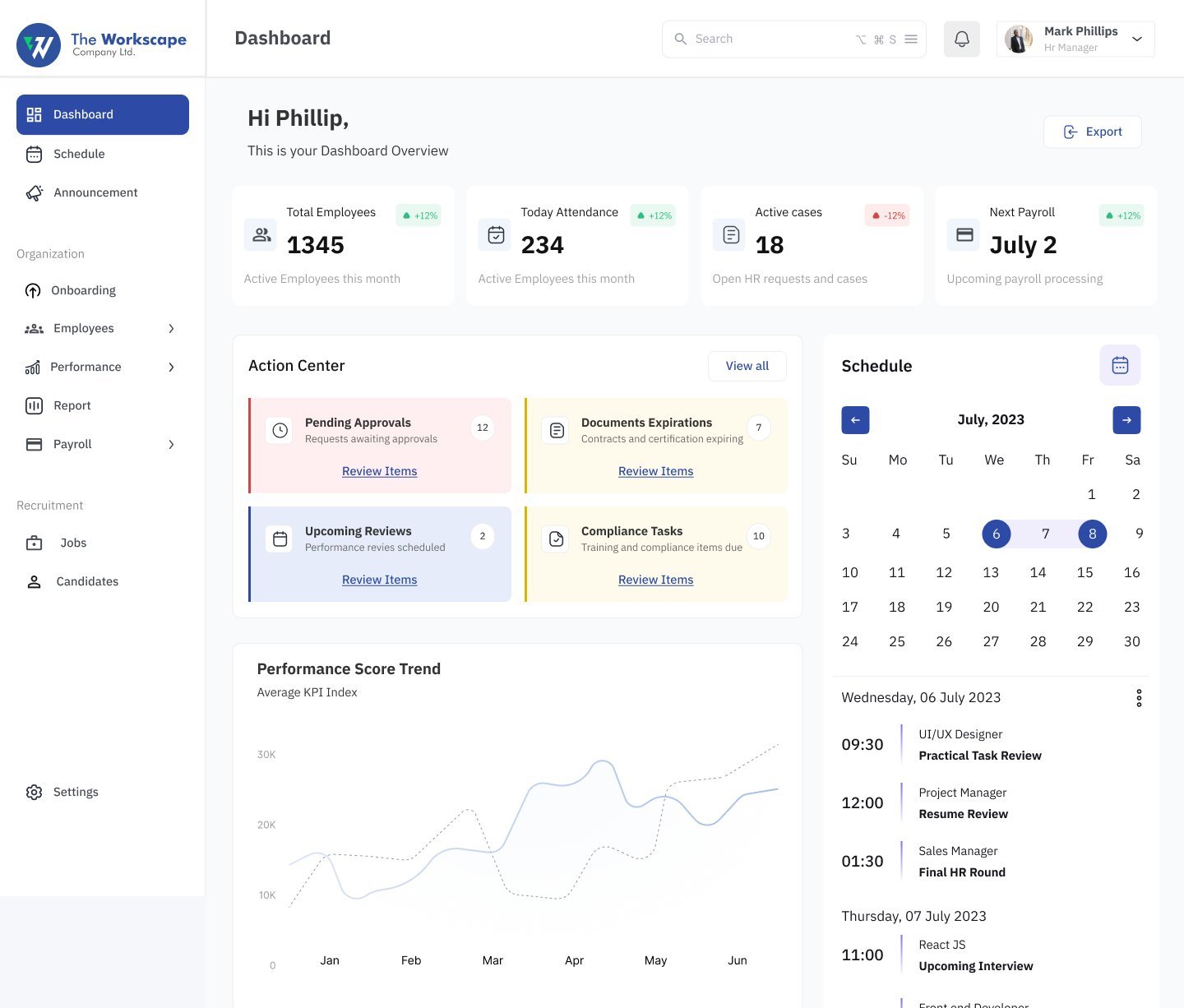
Dashboards open on pending approvals, expiring documents and due reviews, not vanity charts.
Everything about someone in tabs
Profile, attendance, projects, leave, performance and payroll share a single page per employee.
Wizards for the complex parts
Company setup, payroll and hiring pipelines are built step by step, with clear progress and validation.
Ready to run in five steps
A new company is guided from sign-up to a working workspace: company profile, team members, admin profile, payroll, compliance settings and verification.
Progress you can see. A step bar and percentage complete make a long setup feel short and resumable.
Local by default. Country, currency and time zone are set up front, so payroll and schedules are correct from day one.
One home screen for HR, another for everyone else
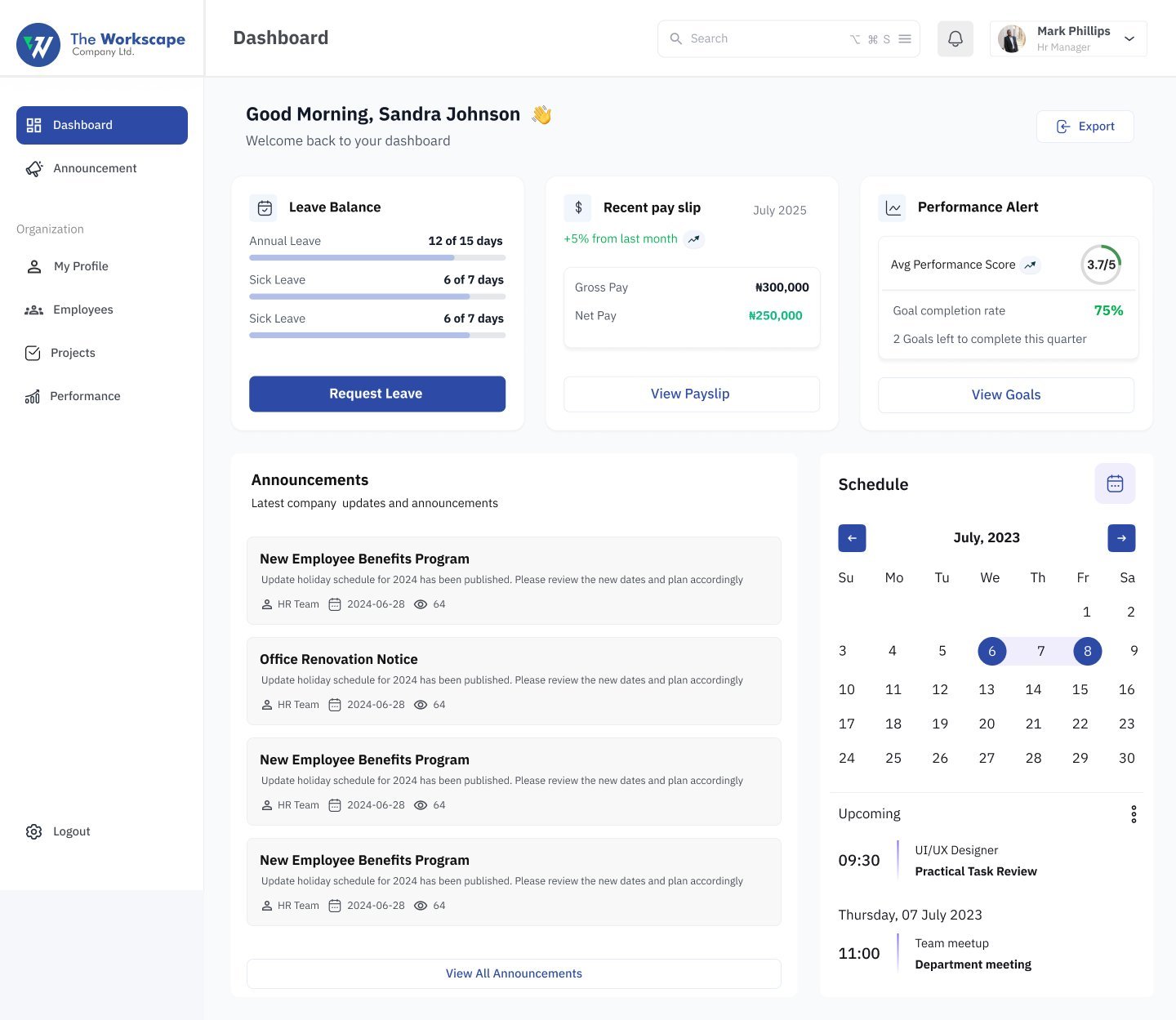
The same layout adapts to who is signed in. HR sees the company and the queue of decisions. Employees see their own leave balance, latest payslip and performance alerts.
An action centre, not a report. Pending approvals, upcoming reviews, document expirations and compliance tasks each show a count and a "Review items" link.
Self-service cuts HR tickets. Leave balance, the latest payslip and goal progress sit on the employee's first screen, each with its next action.
Every employee, one profile
The employee directory leads to a single profile with tabs for personal and professional details, attendance, projects, leave, performance and payroll.
Headline numbers first. Total, new, male and female headcounts sit above the directory with month-on-month change.
Attendance at a glance. Late entries, late clock-outs, missed clock-outs and absences are counted before the log, with On time and Late labels on every row.
Adding people in stages. New employees are added across four tabs: personal, professional, documents and account access.
Leave and pay, without asking HR
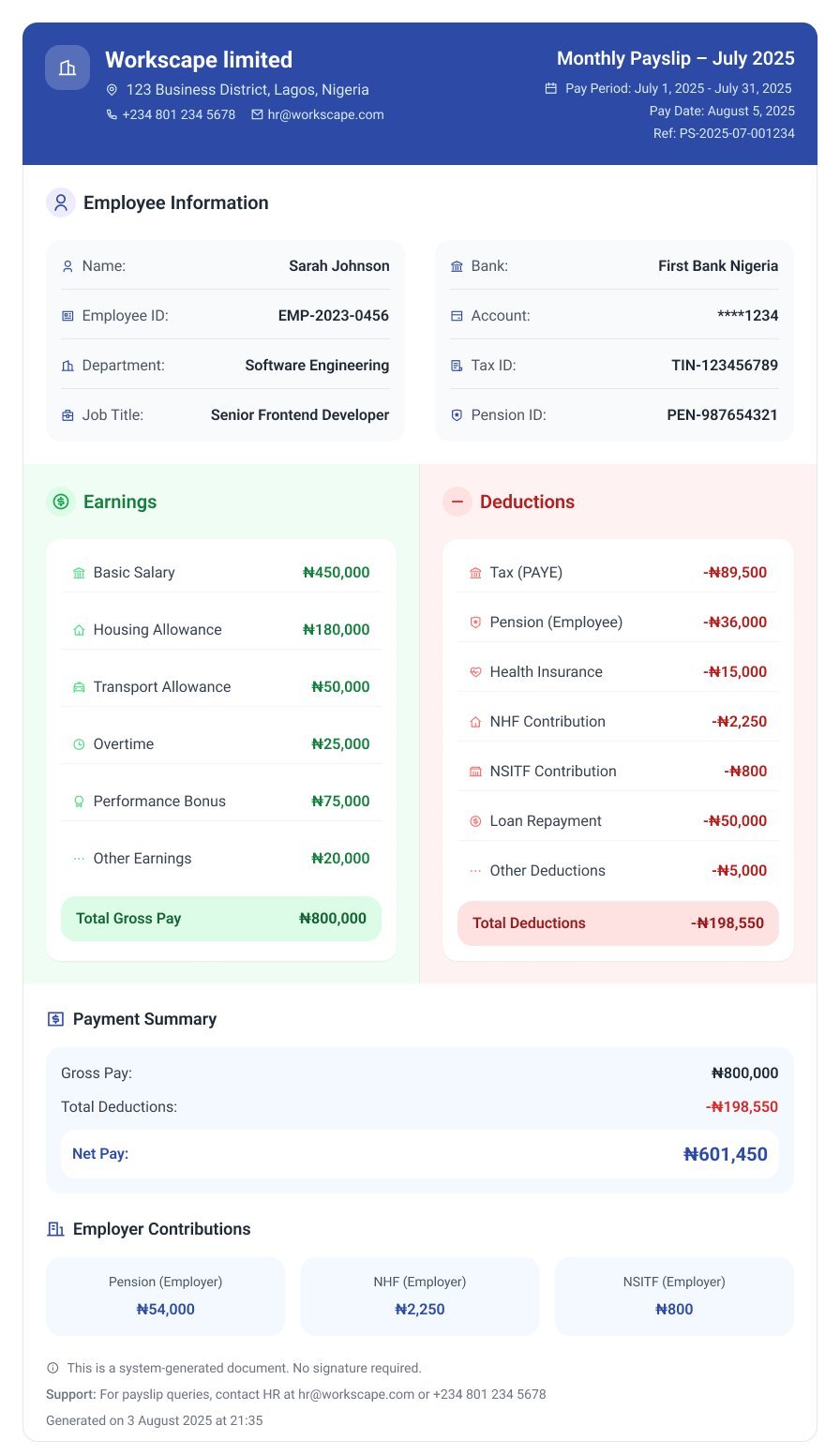
Employees request leave against a live balance and open a clear, itemised payslip whenever they need it.
Reviews built on data, not documents
HR runs review cycles from one analytics dashboard, tracks completion by team and builds review forms with a drag-and-drop builder.
Four numbers that matter. Average score, goal completion, high performers and review completion lead the dashboard, each with its trend.
Build the review, don't email it. A form builder lets HR assemble steps like basic information, rating scales, reminders and review settings.
Self and manager side by side. An employee's self-assessment and manager review appear on the same page, each with its own score.
Payroll set up once, run with confidence
Payroll is the riskiest job in HR. The flow starts with a clear checklist, builds the pay structure step by step and ends with an approval chain.
Validation before saving. Missing fields are listed at the top of the review step, so nothing incomplete reaches a pay run.
A four-person approval chain. Separating who prepares, reviews and approves payroll protects both the company and employees.
From job post to offer in one pipeline
HR creates jobs from templates, configures the hiring stages and moves candidates across a visual pipeline.
Jobs as cards with live counts. Each open role shows candidates applied and interviews completed at a glance.
A pipeline you can drag. Candidates move from Newly applied to Screening, Interview and Test, with a table view for bulk work.
Stages your way. Application, HR screening, technical interview, assessment, hiring manager interview and offer can be reordered and edited.
A calm system for a busy product
A small set of components, built in the file's own style guide, keeps nine modules feeling like one product.
Colour
One confident blue for actions and selection, with green and red reserved for status.
Stat tiles
Every module opens with headline numbers and their trend.
Status labels
One status language across attendance, reviews and payroll.
Steppers
Setup, payroll and job creation all use the same step pattern.
What shipped
A complete HR platform designed end to end, from company setup to the monthly payslip, for both HR teams and employees.
Modules: dashboard, schedule, announcements, employees, projects, performance, payroll, recruitment and settings.
Experiences from one product: HR admin and employee self-service.
Configurable hiring stages, from application to offer.
Roles in the payroll approval chain: preparer, reviewer and two approvers.
What I learned
Design for both sides of HR
Every HR task has an employee on the other end. Designing the admin and self-service views together kept requests and approvals in step.
Wizards earn their place on risky tasks
Step-by-step flows felt slower on paper, but for payroll and company setup they prevented the mistakes that cost real money.
Empty states should teach
The payroll empty state became a checklist, turning a blank page into the clearest guide in the product.
Consistency scales across modules
Reusing stat tiles, status labels and steppers meant nine modules shipped without each one reinventing its own patterns.
Want to work together?
Open to projects, collaborations and full-time roles.