Budget apps assume a salary. Most people don't have one.
Freelancers, business owners and commission earners are paid at different times and in different amounts. Fixed monthly budgets break the moment a client pays late, so people stop trusting them.
Income that moves
Paid per project, per sale or per customer, never on the same date twice.
Running out before payday
Without a forecast, money that looks available is already promised to rent and bills.
Long, cold setup
Long forms ask for everything up front, before people see any value.
Guesses treated as facts
Missing amounts become ₦0 and expected money is counted as cash, so plans quietly mislead.
How might we help someone with irregular income know, every day, what's truly safe to spend?Design challenge
Six rules every screen had to obey
Written before any UI, so design, engineering and the AI all worked from the same definition of an honest plan.
Bills come from real data
Commitments use the obligations the user entered, never arbitrary AI percentages.
Savings & reserve are suggestions
The user can change both at any time.
Flexible = what is left
Calculated from available money after every other allocation.
Expected ≠ available
Expected future income is never treated as cash available today.
Show the shortfall
If commitments exceed available money, say so. Never make the plan look affordable.
AI explains, engine calculates
Numbers come from a deterministic calculation engine. AI only explains and recommends.
One plan, kept honest by four loops
Onboarding produces the first plan. After that, every new income, expense or voice note feeds the same engine, and the plan adapts.
- New user → Welcome → Meet Moneva → Sign up
- Existing user → Log in → Dashboard
- Incomplete profile → resume from the last completed step
- Missing details → Dashboard with a clear prompt to finish setup
- Completed setup → Generate plan → Review → Dashboard
- Edit income, bills or balance → recalculate forecast and plan
From download to a first plan
One question per screen, visible progress, skippable extras. Use the arrows, press play, or pick a stage.
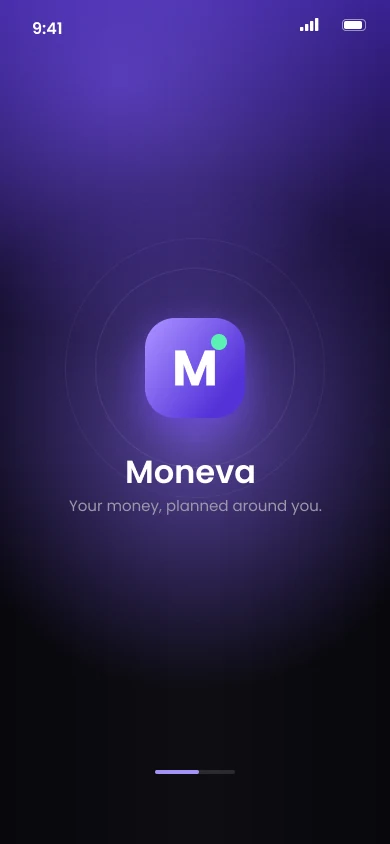
Welcome & accountSplash
Value first, sign-up second
Before asking for anything, the welcome screens show what Moneva does: a safe-to-spend number and a 14-day forecast. The AI companion is introduced as a way to talk about money in plain language.
Password rules tick off live, errors appear inline under each field, and the button stays disabled until everything is valid.
Create a password
- At least 1 uppercase
- At least 1 number
- At least 8 characters
Real numbers, honestly labelled
Three shaping questions, then balance, expected income, bills and savings, each on its own screen, ending in a review that shows what's missing instead of hiding it.
Set up your finances
Unknowns flagged, never ₦0A loading screen that tells the truth
Progress is shown only while real processing runs. And the plan is only generated when there's enough information to calculate responsibly.
Building your money plan.
Checking your entries and projecting the next 30 days.
- Validating your entries
- Projecting 7, 14 & 30 days
- Checking for upcoming shortfalls
- Suggesting allocations
Give every naira a job, honestly
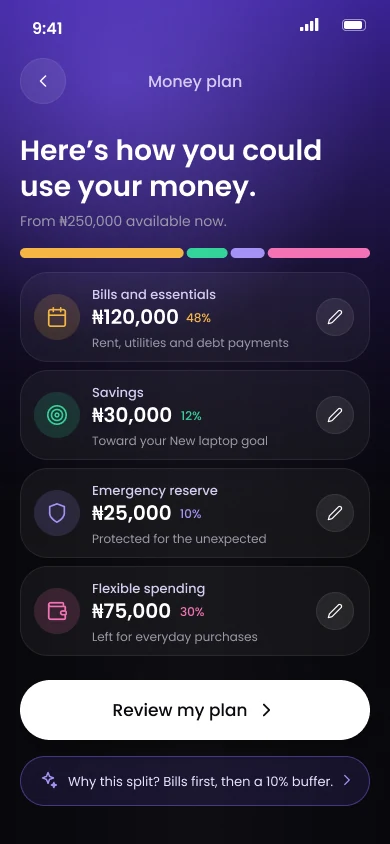
The core of Moneva: protect upcoming bills, set aside savings and a reserve, and see what is truly free to spend. Then adapt when life changes.
Edits can't break the maths
Drag or type an amount. Bills are locked at what you owe, flexible spending updates itself, and the plan stops you before you allocate money you don't have.
Commitments come from real data, so they can't be dragged below what's owed.
When the limit is hit, the message says what to lower first instead of silently capping the value.
Flexible spending updates automatically.
Every state of the plan
Tap a screen to enlargeSee the lowest point before you hit it
A 14-day forecast shows the lowest balance ahead, with or without expected income. Recording money is one tap away, and the plan recalculates instantly.
Expected money stays an assumption
Toggle expected income off and the same forecast tells a different story: a shortfall on rent day. Showing both is what makes the plan trustworthy.
Tap "+" for income, an expense, a commitment, or just tell Moneva.
New income gets a suggested split, but nothing is saved until you approve it.
Talk about money like a voice note
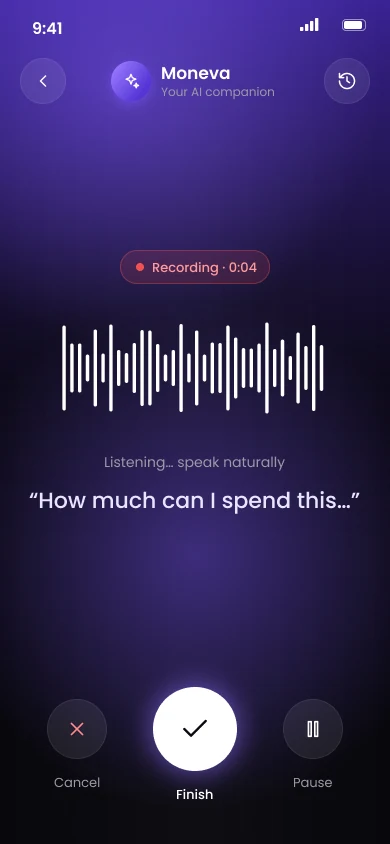
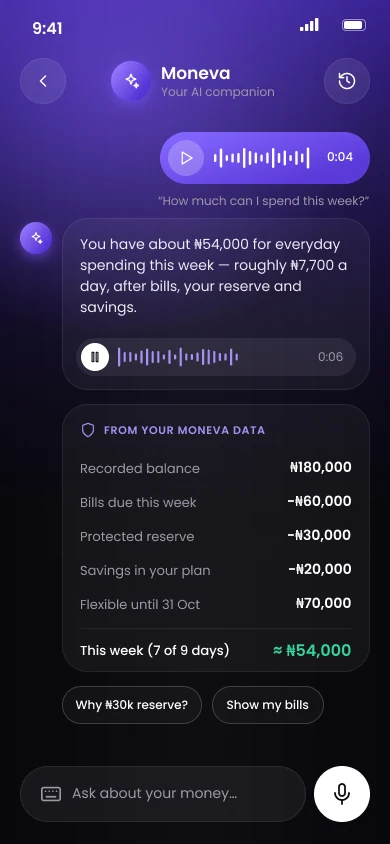
Ask by voice or text. Moneva shows what it heard, fetches real balances, and answers with the numbers behind it. Record a question below to try the flow.
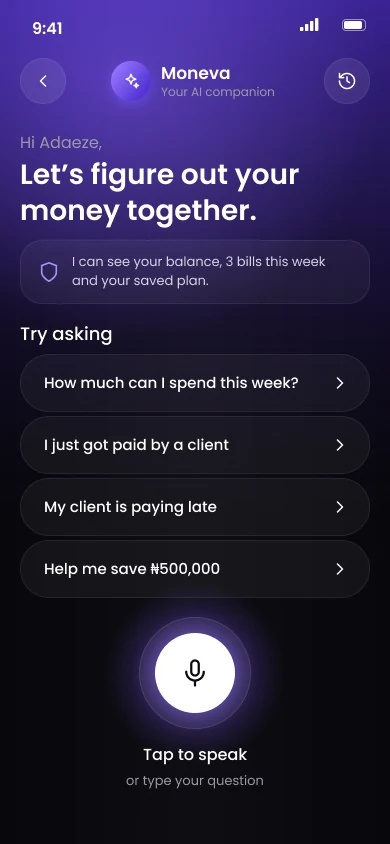
Step 01IdleOpen Moneva. Suggestions show what it can do.
Nothing is sent unheard
A transcript review step lets you correct it, re-record or cancel before Moneva acts.
Numbers show their working
Every answer lists the balances it used, straight from Moneva's calculation engine.
Voice prepares, you approve
Voice-prepared entries and replans always pass through a confirmation card.
Mic asked on first use
Microphone access is requested the first time you record, not during setup.
Dark, focused, and easy on the eyes
Colour
A deep violet gradient for focus. Green is reserved for money that's safe to spend.
Progress
A segmented bar and "3 of 7" label keep setup feeling finite.
States
Every input and plan has a valid, missing and error state designed up front.
One primary action
A single white pill button at the bottom of every screen, with a quiet secondary link underneath.
What I learned
Honesty builds trust
Labelling estimates, showing shortfalls and refusing to treat missing amounts as ₦0 made the plan feel trustworthy, not just pretty.
Short beats complete
One question per screen with a visible "3 of 7" felt faster than one long form, even with more screens.
Design the unhappy paths early
Errors, limits, shortfalls and dropped connections were designed alongside the happy path, so nothing felt like an afterthought.
AI explains, it doesn't decide
Keeping the numbers in a calculation engine and the AI on explanations meant every answer could show its working.
Let's build something smart.
Open to projects, collaborations and full-time roles.